
A Power BI semantic model is the governed analytical layer behind one or more reports. It contains tables, relationships, measures, hierarchies, metadata, storage-mode settings, and, where required, security rules. A report consumes that layer; it is not the layer itself.
A report can look correct while its model remains fragile. Totals may change when a new slicer is added, different authors may define revenue differently, or a page may slow down as data grows. Strong Power BI semantic model best practices address those risks in order: define the business process and table grain, build a star schema, configure predictable relationships, create reusable measures, and then tune storage and performance.
What a Power BI semantic model is—and why model design matters
Microsoft now uses semantic model for the object formerly called a Power BI dataset. The terminology changed, but the role is familiar: it turns prepared data into business-ready fields, calculations, and relationships that can be reused across reporting experiences. See Microsoft’s semantic model overview for current terminology and capabilities.
- Semantic model: The analytical contract. It defines tables, relationships, measures, metadata, and often security logic for consistent analysis.
- Report: A collection of pages and visuals that queries a semantic model.
- Dashboard: A Power BI service consumption experience built from tiles, usually emphasizing key metrics rather than providing the modeling layer.
- Dataflow: A reusable data-preparation asset. It can cleanse and shape data before data reaches a semantic model, but it does not replace the model’s relationships and measures.
- Source database, lakehouse, or warehouse: The operational or analytical data store. It remains responsible for source data quality, durable transformations, and, in many architectures, conformed entities.
Consider a sales model used by several departments. A report might show monthly revenue, gross margin, and units by region. The semantic model determines whether Revenue has one approved definition, whether Region filters Sales correctly, whether order dates or ship dates are in use, and whether the same metric can be reused in another report.
Model design is a correctness concern before it is a performance concern. A fast model that produces misleading numbers is not useful, and a correct model that nobody can understand will be difficult to govern.
Start with the business process and define the grain
Before creating relationships or writing DAX, state the grain of every fact table. Grain means exactly what one row represents. A sales fact table may contain one row per sales order line; a balance table may contain one row per account per day; a budget table may contain one row per cost center per month.
Write the grain as a sentence and check it against the source keys. If FactSales has one row per order line, an order can span many rows. Summing line revenue is valid, while counting orders requires a distinct-count measure. If the source contains repeated extracts of the same order line, a simple sum can overstate revenue. That is a data-quality and grain problem, not a relationship setting that DAX should conceal.
Identify facts, dimensions, and the measures users need
- Fact tables record events or observations: sales lines, payments, inventory snapshots, claims, or ledger postings. They usually hold foreign keys and numeric values to aggregate.
- Dimension tables describe the entities used to filter and group facts: Date, Customer, Product, Account, Department, and Region.
- Measures express approved business calculations in the current filter context, such as Revenue, Gross Margin %, Active Customers, or Closing Balance.
For the sales example, FactSales might contain OrderDateKey, CustomerKey, ProductKey, Quantity, NetSalesAmount, and CostAmount. DimProduct contains Product Name, Brand, Category, and Subcategory. The approved Revenue measure belongs in the semantic model so every report uses the same calculation.
Document expected aggregation behavior before building visuals. Sales amount is usually additive across dates and organizations. A daily account balance is generally not additive across dates; a month total needs a closing-balance rule instead. Deciding that at the model layer prevents attractive but incorrect charts later.
Use a star schema as the default analytical design
A star schema places fact tables in the center and connects them directly to surrounding dimensions. Dimensions filter and group; facts summarize. Microsoft’s star schema guidance recommends this dimensional pattern because it creates an understandable analytical structure and supports efficient filtering.
In the sales example, Date, Customer, Product, and Region each connect to FactSales. A report author can put Product Category on rows, Month on columns, and Revenue in values without reconstructing source-system joins. That directness is why a Power BI star schema is a strong default.
Keep dimensions wide and descriptive; keep facts narrow and numeric
Place descriptive attributes where people expect to browse them: product category and brand in DimProduct, customer segment and country in DimCustomer. Keep fact tables focused on keys and event values. This avoids repeating descriptive text across a large transaction table and gives report authors a cleaner field list.
Relationship columns must support the intended one-to-many pattern. The key on the dimension side must be unique, while the related key repeats in the fact. Warehouse surrogate keys are often suitable when they identify a dimensional member reliably. Business keys can also work when they are stable, compatible in data type, and unique on the one side.
Avoid snowflaking unless there is a clear reason
A snowflake splits a dimension into additional related lookup tables—for example, Product linking to Subcategory, then Category. That may mirror a source application, but it adds joins and can make report authoring less direct. In many Power BI models, bringing descriptive category and subcategory attributes into one usable DimProduct table is easier to understand.
Exceptions exist. A shared governed dimension, source ownership boundaries, or scale constraints can justify a snowflaked design. Document the added relationship path and make sure it improves reuse or maintainability enough to justify the extra complexity.
Handle role-playing dimensions and bridge tables deliberately
A role-playing dimension serves more than one purpose. Date is the common example: FactSales can contain Order Date, Ship Date, and Delivery Date. Only one relationship between the same two tables can be active at a time. Make the most common reporting role active, then use USERELATIONSHIP inside a focused measure when another role is required.
For example, a Ship Revenue measure can activate the inactive Ship Date relationship within CALCULATE. If users regularly need to slice by order date and ship date independently on the same page, separate role-playing Date dimensions can be clearer. The cost is duplicated dimension storage and a more complex field pane.
Many-to-many business rules need an explicit design. If a salesperson can belong to several regions, create a bridge table containing SalespersonKey and RegionKey, then test the filter paths. Verify that a Region slicer filters the intended salespeople and sales rows, and that Revenue remains correct when Region and Customer slicers are used together. Microsoft’s many-to-many relationship guidance describes bridge-table patterns and their trade-offs.
Configure relationships for predictable filtering
Relationships determine how filters propagate between tables. They therefore affect both what a visual means and how much work a query performs. Review automatically detected relationships rather than assuming they match the business model.
Prefer one-to-many and single-direction filtering where possible
The standard pattern is a one-to-many relationship from a dimension to a fact, with single-direction filtering from the dimension to the fact. DimProduct filters FactSales; the sales fact does not normally filter the product dimension. This makes the filter path easy to explain, test, and maintain.
Check key data types, uniqueness on the one side, and unmatched keys. An Unknown member in a dimension can be a deliberate way to retain fact rows with missing source keys, but it should be an agreed data-quality policy rather than an accidental blank category.
Treat bidirectional and many-to-many relationships as exceptions
Bidirectional filtering can be appropriate in a constrained scenario, especially where a bridge table must propagate a filter. It can also introduce ambiguous paths, unexpected totals, and more query work. Enable it only when you can draw the required filter path and verify results with representative combinations of slicers, cross-highlighting, and totals.
Apply the same discipline to many-to-many cardinality. Before relating two tables many-to-many, ask whether their grains differ, whether a missing dimension is needed, or whether a bridge table better represents the business rule. A direct many-to-many relationship is not a default repair for imperfect source data.
Build and mark a proper date table
For production reporting, use an explicit, governed Date dimension instead of relying on hidden automatic date tables. A conventional Date table has one row per date, a unique Date column, no blanks or gaps, and a range that covers the required reporting period. Include useful attributes such as year, quarter, month number, month name, fiscal period, and sort columns.
For DAX time-intelligence patterns that use a marked date table, follow Microsoft’s date-table design guidance, including its requirements for marking the table. Decide on one governed date-table approach for the model and verify current Microsoft guidance before standardizing time-intelligence logic. Avoid treating Auto date/time as a substitute for enterprise date logic.
Build a measure-first DAX layer
Use a measure when the answer should change with report selections. Use a stored column when users need a row-level attribute for slicing, grouping, sorting, relationships, or another persisted modeling purpose. In Import tables, calculated columns are normally evaluated during refresh and stored in the model, while measures are evaluated when a query runs in its filter context. Microsoft’s calculation options guidance explains the different calculation choices.
Do not carry that Import-model mental model unchanged into DirectQuery or composite models. Calculated-column support and restrictions can vary by storage mode, and transformations applied in Power Query may be folded to and executed by the source rather than materialized in Power BI. Review Microsoft’s current DirectQuery guidance and test the selected storage design before relying on a calculated field for performance or persistence behavior.
Use explicit measures for business calculations
Create named measures for important metrics rather than relying on implicit sums created by dragging numeric columns into visuals. Explicit measures are reusable, consistently formatted, and easier to audit.
Revenue = SUM ( FactSales[NetSalesAmount] )
Cost = SUM ( FactSales[CostAmount] )
Gross Margin = [Revenue] - [Cost]
Gross Margin % = DIVIDE ( [Gross Margin], [Revenue] )
This pattern creates a calculation layer that downstream measures can reuse. Report authors select Revenue rather than deciding whether to sum gross sales, net sales, or an unvalidated field. Apply format strings deliberately: currency for Revenue, percentage for Gross Margin %, and whole number for Units.
Use calculated columns only when row-level stored results are needed
In an Import table, a calculated column is appropriate when it creates an attribute needed in a slicer, relationship, row, or column—for example, a product band or compound label. It is not interchangeable with a dynamic measure. Because imported calculated-column values are stored, they can add refresh work and model size.
Power Query custom columns can also become part of imported model data, but in DirectQuery their behavior depends on whether the transformation folds to the source and on source capabilities. Keep data-shaping work in the layer that owns it. Removing duplicate order-line extracts, standardizing customer identifiers, or producing a conformed customer dimension are upstream data-quality tasks. Resolve them in the source, warehouse, lakehouse, or managed preparation process where possible.
Use a DAX calculated table when a model-level table is genuinely required, such as a small disconnected parameter table or a carefully designed helper table. Do not use calculated tables to compensate for an undefined fact-table grain.
Write DAX that matches the model before optimizing syntax
Durable DAX starts with a clear model and a correct understanding of filter context. Validate a measure against known totals at the stated grain before trying to tune it. Then improve maintainability: use meaningful names, build complex logic from base measures, use variables where they clarify repeated or intermediate logic, and avoid iterating a large fact table when a direct aggregation answers the business question.
Adopt a consistent reference style across the team. A common convention is to fully qualify column references, such as FactSales[NetSalesAmount], while using unqualified measure references, such as [Revenue]. If a measure is slow, also examine the relationship path, cardinality, and data volume; formula syntax alone cannot compensate for weak model design.
Organize the semantic model for reuse and governance
Use a dedicated measures table, display folders, descriptions, and consistent names
Make approved fields easy to find. Put measures in a dedicated Measures table or clearly managed measure groups, and use display folders for areas such as Sales, Margin, Inventory, and Time Intelligence. Add descriptions that define the metric, identify important exclusions, and state its date basis.
Establish simple operating standards: name a business owner for key measures, maintain a change record for definition changes, and test dependent reports before altering widely used logic. Certification can support this governance process where the organization uses it, but certification does not replace clear definitions and ownership.
Hide technical fields without confusing hiding with security
Hide surrogate keys, relationship keys, staging columns, and implementation-only helper fields from report authors. Hiding improves the field-pane experience, but it does not reduce model storage or restrict access to data.
Apply the security or permission mechanism that matches the access requirement. Row-level security filters rows for users or roles; object-level security can restrict access to selected model objects in supported scenarios; workspace roles, Build permission, and source-system permissions each govern different forms of access. Review Microsoft guidance for row-level security, object-level security, and Build permission when designing a shared model.
Design for a shared semantic model, not one report page
Expose stable business concepts rather than the accidental layout of one report page. Preserve measure names when possible, document breaking changes, identify dependent reports before modifying core logic, and keep technical implementation fields out of the report-facing experience. These habits make a model safer to reuse across reports, Excel connections, and future reporting needs.
Optimize model size, refresh behavior, and report-query performance
Reduce data volume before it enters the model
Start with the highest-impact question: does the model need this row and this column? Remove unused columns, restrict history to the period the model must analyze, and assign appropriate data types. Review columns with many distinct values—such as transaction IDs, free-form text, GUIDs, and overly precise timestamps—because they can increase model cost. Retain them only when they have a reporting, relationship, drill-through, or operational purpose.
A semantic model is not a warehouse substitute. If a source requires durable deduplication, slowly changing-dimension processing, or conformed entities across multiple business processes, resolve that work upstream where the organization can govern and reuse it.
Choose Import, DirectQuery, Direct Lake, or composite models based on constraints
Choose storage mode from the requirements for freshness, scale, source location, query behavior, and governance. The following comparison is a starting point, not a substitute for testing the intended workload.
| Option | Best fit | How queries are served | Primary dependency | Main trade-off |
|---|---|---|---|---|
| Import | Most analytical models where scheduled or managed refresh meets the freshness need. | From data loaded into the semantic model. | Refresh design and sufficient capacity for the imported model. | Data is not live between refreshes. |
| DirectQuery | Scenarios requiring source-resident data, near-real-time queries, or source-enforced constraints that make full import unsuitable. | At interaction time against the underlying source. | Source design, query folding, gateway behavior, concurrency, and visual discipline. | Source latency and workload directly affect report responsiveness. |
| Direct Lake | Supported Fabric scenarios with data in the appropriate OneLake or SQL-based architecture. | Against supported Delta-table data using Direct Lake behavior. | Fabric architecture, capacity, supported features, and current product limitations. | It is not a general replacement for Import or DirectQuery outside supported scenarios. |
| Composite model | A defined mixed-storage need, such as imported aggregations over detailed DirectQuery data. | From more than one storage mode, depending on the table and query. | Careful storage-mode, relationship, and aggregation design. | Greater modeling and troubleshooting complexity. |
Import is a strong default for many analytical workloads because it provides broad modeling flexibility and avoids sending every visual interaction to the source. It is not an unconditional performance guarantee: refresh windows, capacity, model design, and report layout still matter. For current behavior and limitations, consult Microsoft’s composite model and storage-mode guidance and the Direct Lake overview.
Use incremental refresh and aggregations when the scenario supports them
Incremental refresh partitions a table so the service can retain historical data while refreshing a recent period. It suits large, append-oriented fact tables when the source query can filter efficiently by date parameters. Test query folding and partition boundaries carefully; incorrectly inclusive date filters can duplicate rows across partitions. Microsoft documents the current prerequisites and configuration in its incremental refresh guidance.
Aggregations can speed up common high-level queries by serving summaries from an imported aggregation table while detailed requests reach the underlying detail table. They are most useful when users repeatedly analyze data at a higher grain than the detailed fact. Treat both aggregations and incremental refresh as architecture choices whose availability and behavior depend on the selected storage mode and current service capabilities.
Measure performance instead of guessing
Use a repeatable triage sequence rather than changing DAX or storage settings at random:
- Reproduce the issue. Test the slow page with realistic date ranges, slicers, and user interactions.
- Isolate the visual. Use Performance Analyzer to identify whether one visual, a group of visuals, or initial page load is the main problem.
- Classify the delay. Separate visual rendering and page complexity from query duration. In DirectQuery models, treat source execution, network or gateway behavior, and source concurrency as additional candidates for investigation.
- Inspect the relevant layer. For an Import model, review model size, column cardinality, relationships, and the copied query or measure logic. For DirectQuery, inspect folding, source query plans, indexes, concurrency, and gateway conditions.
- Change one factor and retest. Record the scenario, change, and result so an apparent improvement is not caused by a different filter state or cached response.
Use Performance Analyzer to isolate slow visuals and queries
Power BI Performance Analyzer helps identify expensive visuals and reports timing information, including DAX query time where applicable. It can also copy a visual’s query for further analysis. Use it to identify the affected visual and whether the delay is associated with query work, rendering, or page complexity. In DirectQuery, a high query duration is a reason to investigate the source query, gateway, network path, and source workload; Performance Analyzer alone does not separate those components. Microsoft’s Performance Analyzer documentation describes the current interface and workflow.
Test more than a narrow best-case filter. A measure that appears fast for one customer and one month can behave differently across all customers and several years of history.
Inspect the model with appropriate analysis tools
After locating the slow area, inspect the model rather than guessing at syntax. Review relationship paths, table storage modes, unnecessary columns, and expensive high-cardinality fields. VertiPaq Analyzer-style metrics help reveal how imported-model memory is distributed across tables and columns, making them useful when the question is, “What is making this model large?”
DAX Studio’s Model Metrics feature is an optional vendor-provided tool for inspecting model and VertiPaq-related metrics. Tool behavior can change by version, so verify the current workflow in its documentation. External tools can support diagnosis, but they do not replace a sound dimensional model or realistic performance testing.
A practical Power BI semantic model review checklist
- Grain: Does every fact table have a one-sentence grain statement, and do the source keys support it?
- Schema: Are facts central and dimensions descriptive, with one clear purpose per table?
- Relationships: Are standard relationships one-to-many and single-direction from dimensions to facts?
- Exceptions: Are bidirectional, inactive, and many-to-many relationships documented and tested with combined slicer scenarios?
- Date logic: Is there a governed Date table, with intentional role-playing behavior and documented time-intelligence logic?
- Measures: Are key metrics explicit measures with validated totals, appropriate formats, descriptions, and business ownership?
- Stored calculations: Is each calculated column or table necessary for a row-level or model-level purpose, and has its behavior been checked for the selected storage mode?
- Usability: Are technical fields hidden, measures organized in display folders, and report-facing names understandable to another author?
- Security: Have RLS, OLS, Build permission, workspace access, and source permissions been considered separately from hidden fields?
- Volume: Have unused rows, columns, and unnecessary high-cardinality attributes been removed before loading?
- Storage: Does the selected storage mode match actual freshness, scale, source-performance, Fabric, and governance constraints?
- Evidence: Has Performance Analyzer been used with realistic report interactions, followed by model, source, gateway, or visual investigation at the identified bottleneck?
A semantic model becomes easier to improve when its logic is easy to explain. Begin with business grain and a clean star schema. The DAX, governance, and performance choices that follow will be more reliable and easier to reuse.
Power BI Semantic Model Best Practices
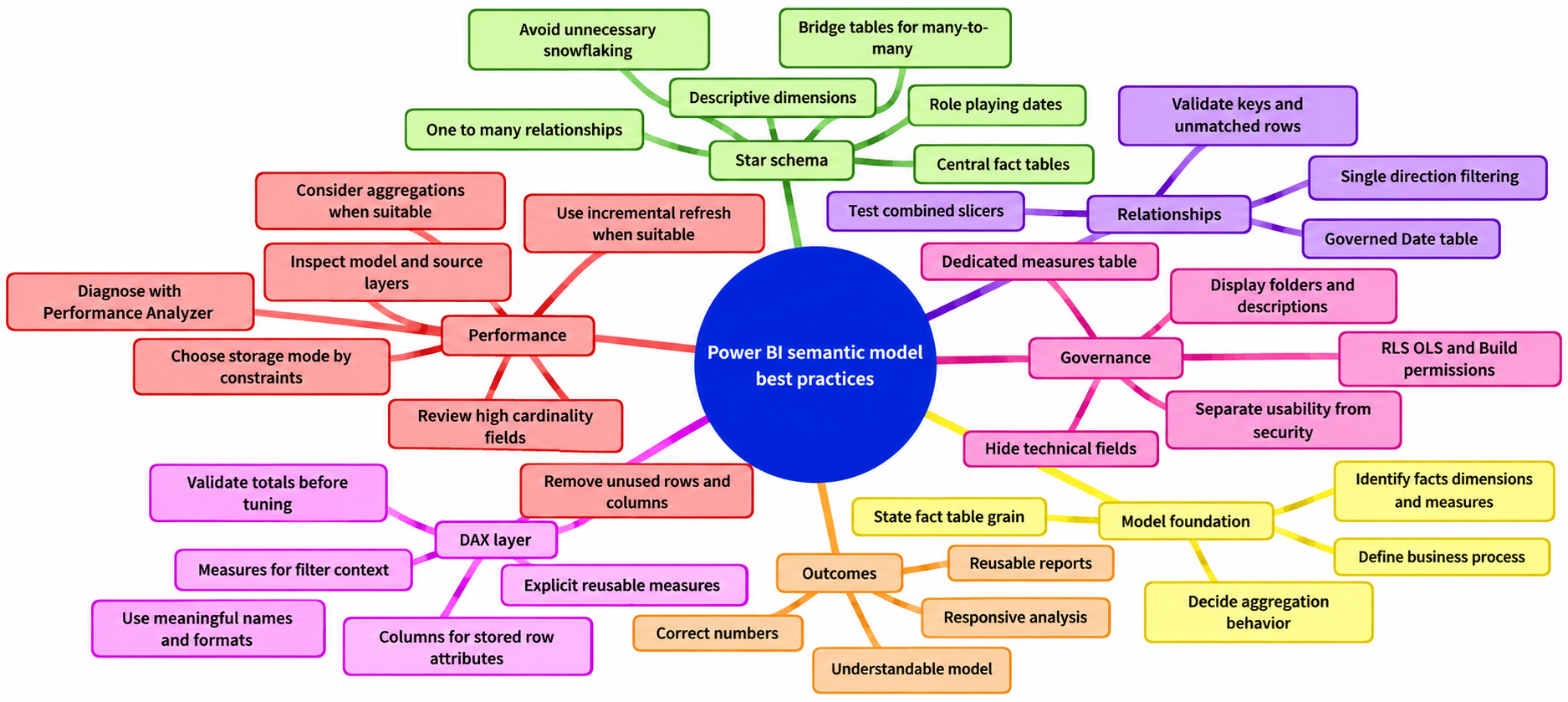
Frequently asked questions about Power BI semantic model best practices
What is a Power BI semantic model?
A Power BI semantic model is the governed analytical layer behind one or more reports. It contains tables, relationships, measures, hierarchies, metadata, storage-mode settings, and, where required, security rules.
Why is a star schema recommended for Power BI?
A star schema places fact tables at the center and connects them directly to descriptive dimension tables. This makes filtering and grouping easier to understand and provides a clear analytical structure for report authors.
What is the recommended relationship pattern in Power BI?
Use one-to-many relationships from dimensions to facts with single-direction filtering where possible. Treat bidirectional and many-to-many relationships as exceptions that require documented filter paths and testing.
Should Power BI calculations be measures or calculated columns?
Use measures for calculations that should respond to report selections, such as Revenue or Gross Margin %. Use calculated columns when a stored row-level attribute is needed for slicing, grouping, sorting, relationships, or another modeling purpose.
How can Power BI semantic model performance be diagnosed?
Reproduce the issue with realistic filters, isolate the slow visual with Performance Analyzer, classify the delay, and inspect the relevant layer. Depending on the storage mode, this may include model size, relationships, DAX, visual complexity, source queries, gateway behavior, or source workload.
How should a Power BI model handle multiple dates?
Use a governed Date dimension and document the date roles. For example, one relationship between sales and Date can be active for Order Date while a focused measure uses USERELATIONSHIP for Ship Date. Separate role-playing Date dimensions may be clearer when users need independent date slicing.
Which Power BI storage mode should be used?
Choose Import, DirectQuery, Direct Lake, or a composite model based on freshness, scale, source location, query behavior, governance, and supported architecture. Import is a strong default for many analytical workloads, but the selected design should be tested against the intended workload.
Sources
- Microsoft Learn: Semantic models in the Power BI service
- Microsoft Learn: Understand star schema and the importance for Power BI
- Microsoft Learn: Many-to-many relationship guidance
- Microsoft Learn: Design guidance for date tables in Power BI Desktop
- Microsoft Learn: Use calculation options in Power BI Desktop
- Microsoft Learn: About using DirectQuery in Power BI
- Microsoft Learn: Row-level security in Power BI
- Microsoft Learn: Object-level security in Power BI
- Microsoft Learn: Build permission for semantic models
- Microsoft Learn: Composite model guidance in Power BI Desktop
- Microsoft Learn: Direct Lake overview
- Microsoft Learn: Configure incremental refresh for Power BI semantic models
- Microsoft Learn: Use Performance Analyzer to examine report performance
- DAX Studio: Model Metrics
Author: Sepehr Mehrvar