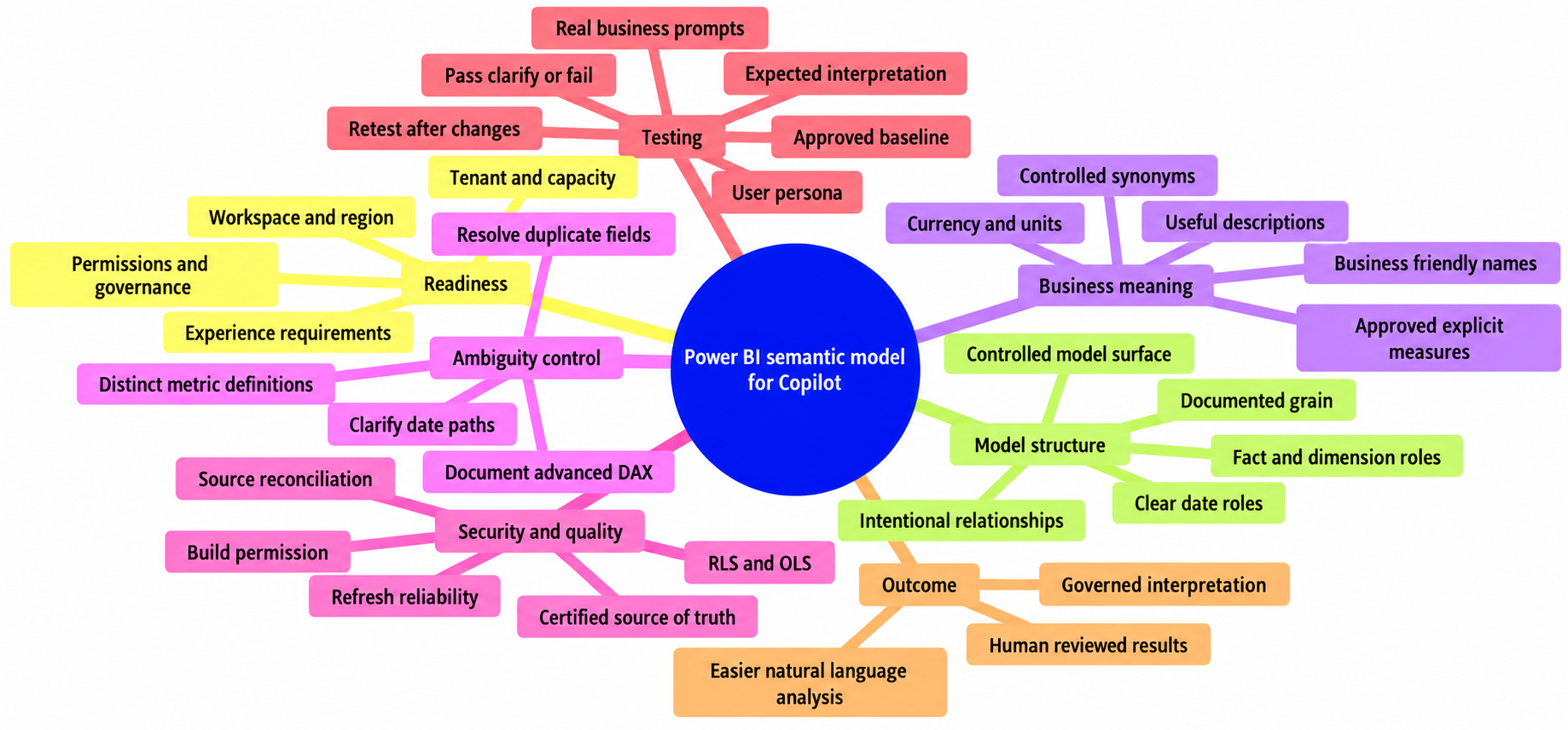
To prepare a Power BI semantic model for Copilot, treat the model as a governed business vocabulary, not merely a technical container for tables. Copilot can help people explore data in natural language, but the quality of its output depends on the measures, names, descriptions, relationships, access rules, and data quality already present in that semantic layer.
Consider a familiar question: “What were sales last quarter?” A report author may know that Sales means invoiced product revenue excluding tax, canceled invoices, and credit memos. A sales leader may mean bookings instead. If the model exposes three sales-like columns, two date paths, and no approved measure, an answer can look credible while using the wrong definition. The objective is not to make Copilot infallible. It is to make the approved interpretation easy to find, hard to confuse, and straightforward to validate.
What Copilot needs from a Power BI semantic model
A Power BI semantic model is the business-facing layer that organizes tables, columns, relationships, measures, hierarchies, formats, and metadata. It allows report authors and consumers to work with business concepts without interpreting every source-system field or transformation.
Copilot context is experience-specific. For Ask data questions, Microsoft documents grounding from report metadata, session conversation, model schema, the full linguistic schema, and model properties such as descriptions, data types, format strings, and data categories. Hidden pages, hidden fields, and private tables are excluded from that grounding context. Other experiences, including report creation and DAX assistance, use different context. Do not assume every model artifact is used in every Copilot interaction; consult Microsoft’s current Copilot semantic-model guidance for the experience you are enabling.
Semantic model quality is an AI usability issue
Natural-language questions are often incomplete. “Margin by region” might mean gross margin, contribution margin, or margin percentage. “Customers” might mean billed accounts, parent accounts, customers with an order, or customers active during a defined period.
A sound model narrows the range of plausible interpretations. Model structure controls filter paths, metadata resolves terminology, explicit measures govern calculations, and testing checks what users actually receive. These are established BI practices, but natural-language access makes their gaps visible to a much wider audience.
Keep Copilot readiness separate from general AI hype
This is not a guide to training a foundation model or building a custom generative-AI application. It is a guide to preparing the Power BI semantic model that a Copilot experience can use. Dimensional modeling, approved metrics, security, and release discipline remain the durable investment.
Microsoft also documents Prep data for AI as a preview capability. Depending on the scenario, it can support AI data schemas, AI instructions, verified answers, and an Approved for Copilot (preview) status. These are optional, experience-specific enhancements, not universal semantic-model requirements or proof that an output is correct. They can improve relevance and reduce ambiguity, but they do not replace careful modeling and validation.
Start with readiness: platform, access, and governance prerequisites
Copilot availability, capacity rules, tenant settings, supported regions, and interface labels can change. Before investing heavily in model refinements, have a Fabric or Power BI administrator confirm the current requirements for the exact Copilot experience and deployment scenario using Microsoft’s enable and configure Copilot in Microsoft Fabric guidance.
Confirm feature, tenant, workspace, capacity, licensing, and regional availability
Do not generalize a requirement from one Copilot experience to another. Microsoft’s capacity guidance distinguishes a paid, Copilot-enabled capacity from a workspace’s license mode. Trial capacity SKUs are unsupported, while a Trial-license-mode workspace can be usable when its user is assigned to a qualifying paid Copilot capacity. Confirm the tenant setting, capacity assignment, region, workspace setup, and user scenario against the current Fabric Copilot capacity requirements.
Regional processing is an implementation decision, not a footnote. Microsoft states that prompts, grounding data, and outputs are processed through Azure OpenAI, and that data stays in the capacity region unless an administrator enables out-of-region processing. Review that setting with security, privacy, and compliance stakeholders before broad rollout.
Define who can ask questions and what data they are allowed to see
Copilot is not a separate route around Power BI authorization. Interactions are user-specific and retrieve only data that the authenticated user can access. Review semantic-model permissions, workspace roles, sharing patterns, Build permission, row-level security (RLS), object-level security (OLS), and sensitivity controls as separate parts of the design.
RLS applies to Viewer-role users, not workspace Admins, Members, or Contributors, who have edit permissions. Broader access in those cases comes from the person’s existing Power BI role and permissions, not from a Copilot bypass. Build permission can enable users to work with a shared semantic model and can expose hidden fields, so assign it deliberately. See Microsoft’s guidance on semantic-model permissions and row-level security.
Assign responsibilities plainly. A business owner approves metric definitions and intended use. A technical owner maintains model structure, refresh, and access implementation. A named steward should own the release record and route changes to the appropriate owner.
How to prepare a Power BI semantic model for Copilot
Use a clean star schema and understandable table roles
A star schema is a practical foundation for a Power BI semantic model for AI, although it is not a universal Copilot requirement. Put measurable business events in fact tables, such as Sales Transactions or Support Cases. Put descriptive entities in dimensions, such as Date, Product, Customer, Region, and Salesperson. Every fact table needs a known grain: one row per invoice line, order line, or daily account snapshot, for example.
Prefer straightforward one-to-many relationships and intentional filter direction. Many-to-many relationships, bridge tables, bidirectional filtering, and multiple active paths can be valid, but they need a documented purpose and focused tests. This article focuses on AI readiness; for broader model-design and performance guidance, see Power BI Semantic Model Best Practices: Star Schema, DAX, and Performance, Star Schema vs Snowflake Schema in Power BI, and Microsoft’s star-schema guidance.
Control the model surface area
Expose objects that users should query; keep staging and transformation logic upstream or in a separate layer where practical. In a curated sales model, the visible surface might include Net Sales, Gross Margin %, Invoice Date, Product, Customer, and Region. Objects such as InvoiceKey, SalesAmountRaw, LoadTimestamp, and technical foreign-exchange helper columns should usually be hidden or moved out of the consumption model.
For Ask data questions, hidden fields and measures are excluded from Copilot grounding. That makes hiding useful for reducing irrelevant choices, but it is not a security control: users with Build permission can see hidden fields. Use OLS and permission design when an object must be inaccessible; use hiding when an object is simply not intended for self-service analysis.
A practical audit order is:
- Confirm fact-table grain and identify the authoritative measures.
- Inventory every exposed table, column, hierarchy, and measure.
- Hide, remove, or move non-consumption objects.
- Resolve duplicate concepts and unclear filter paths.
- Complete names, descriptions, controlled synonyms where appropriate, and prompt tests.
Make dates, currencies, and calculation context explicit
Date logic is a common source of plausible but incorrect analysis. Use a complete date table and mark it as a date table where appropriate. Name role-playing dates precisely: Order Date, Invoice Date, Ship Date, and Close Date are not interchangeable.
Make fiscal calendars, currency handling, units, and aggregation behavior equally visible. For example, the description for Net Sales (USD) should identify its date basis and conversion policy. Prior Year Net Sales should state whether it follows the corporate fiscal calendar. Inventory Quantity should say whether it is an end-of-day snapshot, an average balance, or a movement total.
Make business meaning machine-readable and user-readable
Replace technical names with clear business labels
Name tables, columns, hierarchies, and measures in the language users actually use. Avoid source abbreviations unless they are universally understood, and apply a consistent convention for singular and plural names.
Changing Cust_Actv_Flg to Active Customer is only the first step. If it means a customer with at least one paid order in the previous 12 months, the definition belongs in the model. A friendly name without a rule can create false confidence.
Write descriptions that resolve real ambiguity
Descriptions should answer the questions a careful analyst asks before trusting a number: What is included? What is excluded? Which date role applies? What is the grain, unit, currency, or evaluation context? Does a material restatement or refresh timing affect interpretation?
- Weak: “Sales value.”
- Useful: “Net Sales: invoiced product revenue excluding sales tax, shipping, canceled invoices, and credit memos. Reported in USD at monthly average exchange rates. Uses Invoice Date and the corporate fiscal calendar.”
This is an illustrative definition, not a universal finance policy. Use your organization’s approved definition and keep the description concise enough to be useful during analysis.
Use synonyms and phrasing carefully
Synonyms can bridge business vocabulary and model terminology when the terms are truly equivalent. For a measure named Net Sales, “revenue” or “turnover” may be appropriate in some organizations. “Bookings” should not be a synonym if it represents a distinct metric.
Do not assign broad terms such as “sales,” “revenue,” and “margin” to several different measures merely to improve discoverability. First decide whether the concepts are identical or distinct, then express that decision through labels, descriptions, and controlled synonyms. Test the vocabulary people actually use in the Copilot experience you plan to enable.
Prefer approved explicit measures over implicit aggregation
Explicit DAX measures create a governed analytical vocabulary. They can have an approved name, format, description, and test history. Implicit aggregation can be useful for exploration, but it can also produce inconsistent interpretations of a raw amount column.
Create explicit measures for recurring or business-critical questions, such as Net Sales, Gross Margin, Gross Margin %, Order Count, Active Customers, Budget Variance, and Year-over-Year Change. For a closer look at when calculations belong in measures rather than columns, read DAX Measures vs Calculated Columns: When to Use Each.
Remove ambiguity before Copilot encounters it
Resolve competing definitions and duplicate paths
Search for competing concepts: two revenue measures with nearly identical names, multiple customer identifiers, calendar and fiscal date tables, or active and inactive relationships that change what “by month” means.
Choose one approved definition when the business has one definition. When multiple definitions are legitimate, make the difference visible. Use Booked Revenue and Recognized Revenue, not two measures called Revenue. State the date basis for both.
A question should clarify or redirect rather than answer when it contains competing valid measures, ambiguous date roles, mixed currencies, or a missing grain. “Show Net Sales by region for fiscal Q2” should be testable. “Show sales by month” should prompt a distinction if the model contains booked, invoiced, and recognized sales.
Handle advanced DAX and complex relationships with deliberate testing
Calculation groups, field parameters, disconnected tables, composite models, DirectQuery sources, role-playing dimensions, and many-to-many relationships can all be appropriate. Their behavior simply needs more deliberate documentation and testing.
For calculation groups, Microsoft recommends using the calculation-group column description to list and explain calculation items because the items are not included in model metadata. Its current guidance also notes that only the first 200 characters of a description are used. For disconnected parameter tables, explain what the selection changes. For role-playing dates, test prompts against each business date. Microsoft’s semantic-model optimization guidance for Copilot is the right reference for current modeling and evaluation details.
Keep data quality and refresh expectations visible
Copilot cannot reconcile duplicates, repair a failed refresh, infer a late-arriving-data policy, or decide whether a historical restatement should change prior-period comparisons. Check source reconciliation, null handling, duplicate rates, refresh status, and known exclusions before broad release.
Where a limitation is material, document it in the model and communicate it to report owners. A model can be available for questions yet remain unsuitable for financial close, operational action, or another consequential decision.
Apply security and governance before enabling broad AI access
Test security in the same context as real users
Test RLS, OLS, semantic-model permissions, workspace roles, and sensitivity controls with representative accounts or an approved validation method. When RLS is intended to apply, test the actual Copilot experience as a Viewer-role user, not only as an administrator or workspace contributor.
Include dynamic RLS, executive exceptions, cross-functional users, and Build-permission scenarios in the test plan. Review the organization’s sensitivity-label and information-protection policies alongside Microsoft’s documented privacy, security, and responsible AI guidance. That guidance also explains the regional-processing choice: prompts, grounding data, and outputs are processed through Azure OpenAI, with out-of-region processing controlled by an administrator.
Identify the certified source of truth
Use endorsement practices, including promotion or certification where appropriate, to distinguish authoritative semantic models from exploratory content. A release record should name the business owner, technical owner, approved measures, sources, refresh expectations, security design, known limitations, and last validation date.
This gives users a practical answer to two questions: which model should they use, and who approves a change to its definitions or access rules? Microsoft’s endorsement guidance can help establish the distinction.
Test Copilot like an analytics product
Create a prompt test set from real business questions
Do not validate a model with one impressive prompt. Build a reusable set from questions executives, finance analysts, sales leaders, and operations teams actually ask. Cover summaries, trends, rankings, comparisons, drilldowns, time periods, and deliberately ambiguous terms.
| Test field | What to record |
|---|---|
| Prompt and persona | The exact question and intended user role, such as Finance Viewer with RLS. |
| Expected interpretation | Required measure, date basis, filters, currency, and whether clarification is expected. |
| Baseline | An approved report visual, reviewed DAX query, or reconciled source extract. |
| Observed result | Returned measure, totals, filters, narrative, and any unexpected data exposure. |
| Disposition | Pass, clarify, or fail, plus a remediation owner and retest date. |
For example, test “Show Net Sales by region for fiscal Q2” against the approved Net Sales measure and fiscal calendar. Also test “Show sales by month” and record whether the experience appropriately clarifies the metric or whether the model needs clearer terminology.
Validate outputs against approved measures and known scenarios
Compare important outputs with a controlled baseline. Check the selected measure, filters, date range, totals, sort order, units, chart interpretation, and narrative explanation. Microsoft advises human review because generative outputs can be inaccurate or low quality; require that review for financial reporting, regulated decisions, staffing actions, customer commitments, and other material uses.
Use failures to improve the semantic model
When a result is vague or wrong, do not treat prompt wording as the only remedy. Trace the failure to its source. You may need to rename a field, add a description, create an approved measure, remove a duplicate, correct a relationship, refine a synonym, or, where the preview capability fits your scenario, add an AI instruction or verified answer.
Retest after each change. The useful outcome is not a cleverer prompt; it is a semantic model that expresses the business more reliably for every consumer.
A practical Copilot-readiness checklist
- Verify current tenant, capacity, workspace, license-mode, regional, and feature prerequisites for the specific Copilot experience.
- For semantic-model data-question and Prep data for AI scenarios, verify the current Microsoft requirement for Power BI Q&A; do not treat Q&A as a blanket dependency for every Copilot capability.
- Confirm that trial capacity SKUs are not being used where a paid Copilot-enabled capacity is required.
- Test semantic-model permissions, RLS, OLS, workspace roles, and Build permission using realistic user contexts.
- Remember that RLS applies to Viewers, while Admins, Members, and Contributors have edit permissions and are not restricted by RLS.
- Use a clear fact-and-dimension structure with documented grain and intentional relationship paths.
- Hide technical and duplicate fields from the consumption surface; use security controls, not hiding, to restrict access.
- Make date roles, fiscal logic, currencies, units, and aggregation behavior explicit.
- Use business-friendly names and descriptions for important tables, columns, measures, and calculation-group behavior.
- Create approved explicit measures for recurring metrics and distinguish competing definitions.
- Use controlled synonyms only where terms are genuinely equivalent.
- Reconcile source data, review refresh reliability, and document material quality limitations.
- Identify the authoritative model, accountable owners, endorsement status, and change-control path.
- If using Prep data for AI, treat Approved for Copilot (preview) as a readiness signal, not a universal release gate or a guarantee of correctness.
- Maintain a prompt test set with expected measure, date basis, security persona, baseline, observed result, and remediation owner.
Treat Copilot readiness as semantic-model maintenance
Preparing a Power BI semantic model for Copilot is not a one-time setting. New measures, source changes, revised finance definitions, renamed fields, security-role changes, and user feedback can all alter the quality and safety of AI-assisted analysis.
Make semantic-model review part of normal release management. If the model remains understandable to a new analyst, governed for the intended audience, and testable against approved business definitions, it will serve Copilot better. It will also serve reports, dashboards, and direct analysis better.
Preparing a Power BI Semantic Model for Copilot
Frequently asked questions about preparing a Power BI semantic model for Copilot
What does Copilot need from a Power BI semantic model?
Copilot depends on the model’s structure, approved measures, names, descriptions, relationships, access rules, and data quality. Preparation should make approved business meanings easy to find and validate.
How should I structure a Power BI semantic model for Copilot?
Use a clear fact-and-dimension structure with documented grain, understandable table roles, intentional relationship paths, and explicit date roles. A star schema is a practical foundation, although it is not a universal Copilot requirement.
Should technical fields be hidden before enabling Copilot?
Hide or remove technical and duplicate fields from the consumption surface where appropriate. For Ask data questions, hidden fields and measures are excluded from grounding, but hiding is not a security control because users with Build permission may see hidden fields.
Why are explicit measures important for Copilot?
Explicit measures provide approved names, formats, descriptions, and calculation logic for recurring or business-critical metrics. They also reduce ambiguity compared with relying only on implicit aggregation of raw columns.
How should security be tested for Copilot in Power BI?
Test semantic-model permissions, row-level security, object-level security, workspace roles, Build permission, and sensitivity controls with representative user contexts. When RLS is intended to apply, validate the actual experience with Viewer-role users because workspace Admins, Members, and Contributors have edit permissions.
What should a Copilot prompt test set include?
Record the exact prompt, user persona, expected measure and date basis, filters, currency, approved baseline, observed result, disposition, remediation owner, and retest date. Include both common business questions and deliberately ambiguous prompts.
Does Approved for Copilot guarantee correct answers?
No. Approved for Copilot is documented as a preview readiness signal for applicable scenarios. It may improve relevance and reduce ambiguity, but it does not replace careful modeling, security design, data-quality checks, or human validation.
Sources
- Microsoft Learn: Use Copilot with semantic models in Power BI
- Microsoft Learn: Prepare your data for AI to improve Copilot results
- Microsoft Learn: Optimize your semantic model for Copilot in Power BI
- Microsoft Learn: Enable and configure Copilot in Microsoft Fabric
- Microsoft Learn: Fabric Copilot capacity requirements
- Microsoft Learn: Privacy, security, and responsible AI use of Copilot in Fabric
- Microsoft Learn: Understand star schema and the importance for Power BI
- Microsoft Learn: Semantic model permissions
- Microsoft Learn: Row-level security with Power BI
- Microsoft Learn: Promote and certify Power BI content with endorsement
Author: Sepehr Mehrvar