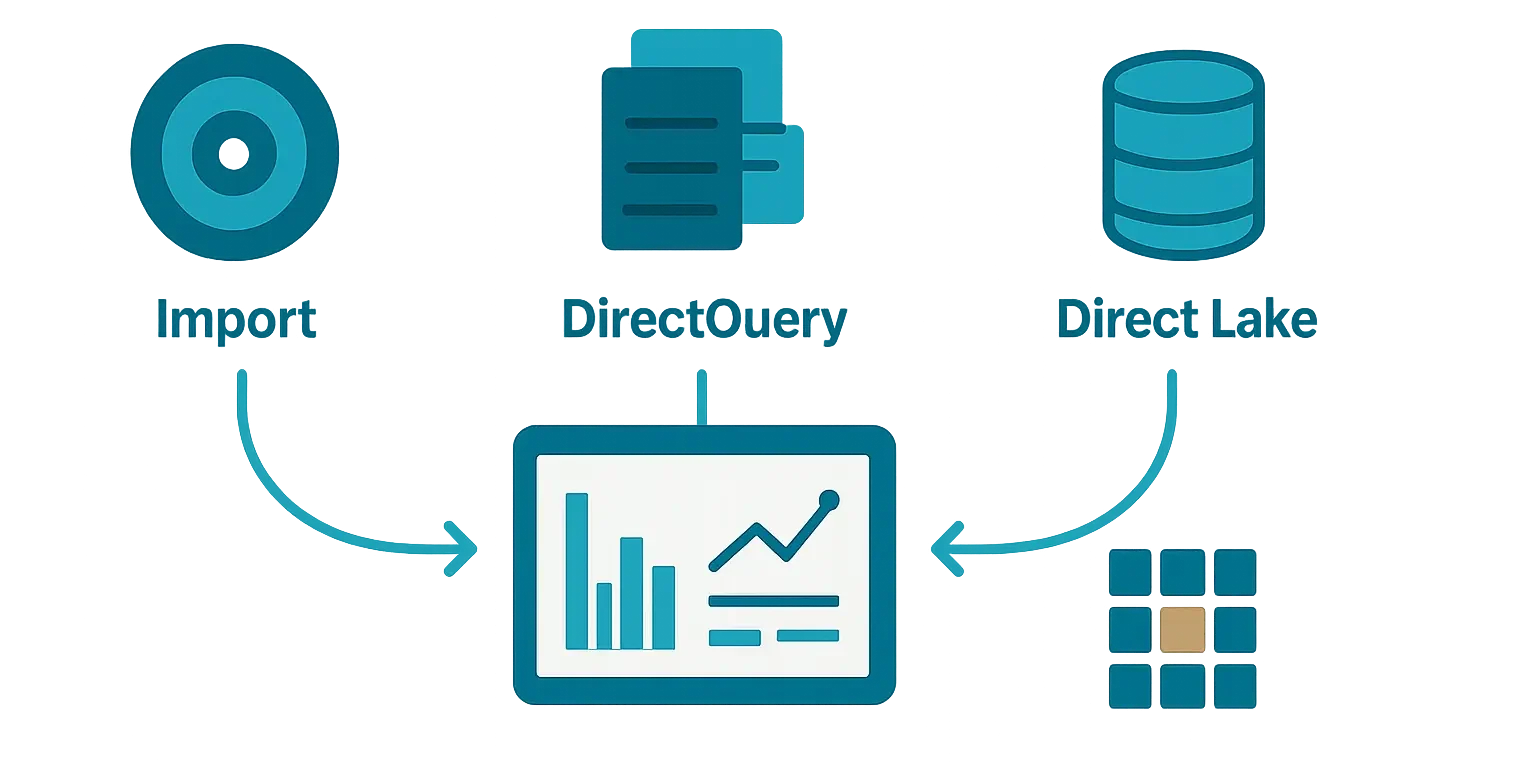
Choosing between Power BI Import vs DirectQuery vs Direct Lake is a semantic-model architecture decision, not a report-level preference. It affects where data is served from, how quickly source changes can become visible, how responsive report interactions feel, and which platform carries the analytical workload.
Microsoft now generally uses semantic model for what many teams still call a dataset. A semantic model contains tables, relationships, measures, business-friendly fields, and often security rules that reports use to answer business questions.
Power BI Import vs DirectQuery vs Direct Lake: the short answer
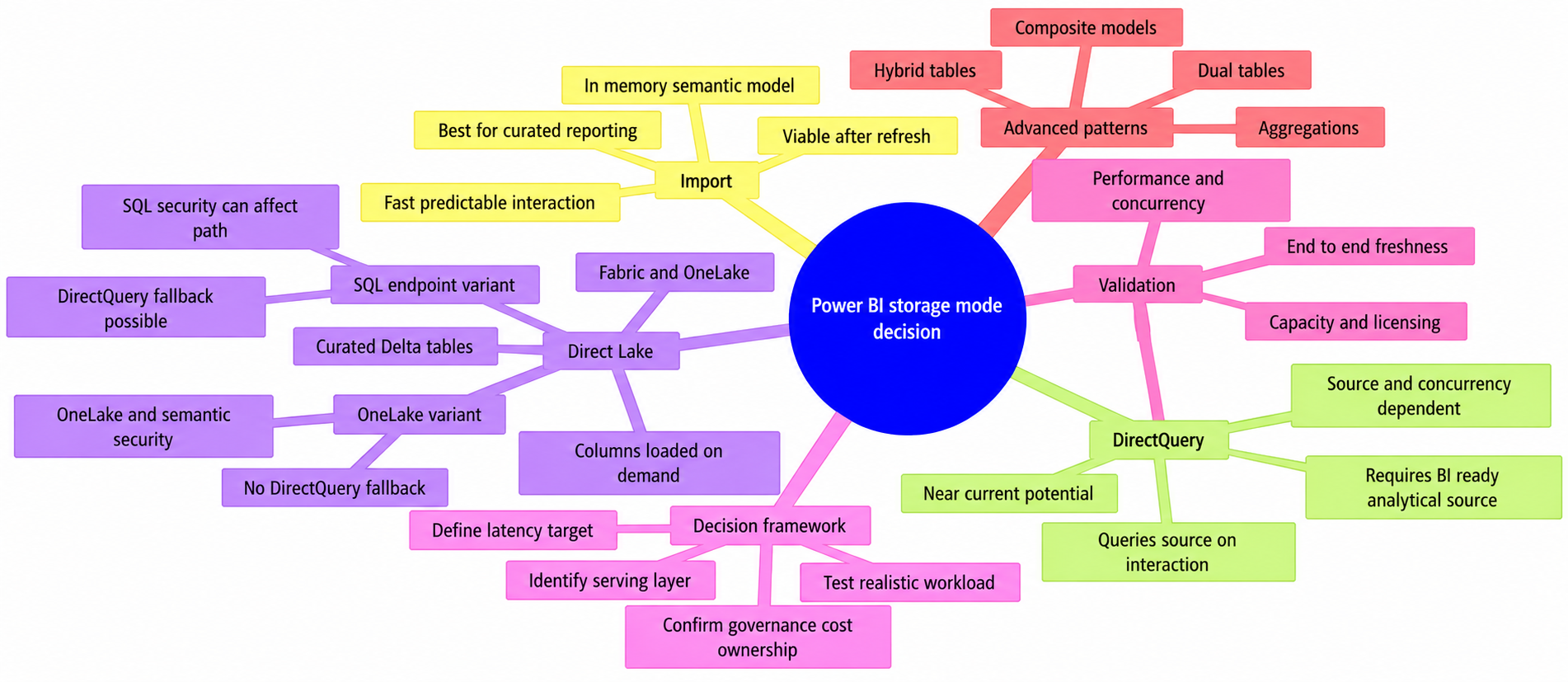
- Import mode loads data into the semantic model’s in-memory cache. Visuals query that model, which commonly provides fast, predictable interactivity. Source changes appear after a successful refresh.
- DirectQuery leaves data in a supported source and sends queries there as visuals need them. It can support near-current reporting, but responsiveness depends on the source, query design, network or gateway conditions, caching, and concurrent use.
- Direct Lake is a Fabric-oriented mode for supported Delta tables in OneLake. It is designed to query curated lake data with low-latency analytical access, but its behavior depends on whether you use Direct Lake on OneLake or Direct Lake on SQL analytics endpoints.
For many curated analytical workloads, Import is the responsive baseline. DirectQuery is justified when source-resident querying is genuinely required and the source is engineered for BI. Direct Lake is compelling when Fabric, OneLake, eligible capacity, and governed lake tables are part of the intended architecture.
How Power BI storage modes affect a semantic model
A report visual does not query a database in isolation. It queries through the semantic model, which applies the model’s relationships, measures, filters, and security. Storage mode changes the route used to retrieve the underlying data. Sound modeling still matters in every route; see these Power BI semantic model best practices for the broader design principles.
It is important to separate freshness from a broad request for “real time”:
- Source update: a transaction, file, warehouse table, or lake table changes.
- Import refresh: Power BI retrieves and processes data into an Import model.
- Visual query: a DirectQuery interaction can send one or more requests to a source.
- Page refresh: a user refreshes a page, or automatic page refresh reissues supported visual queries.
- Caching and tiles: service behavior can mean a report visual or dashboard tile is not a transaction-by-transaction synchronized view.
A useful requirement is measurable: “order exceptions must be visible within 10 minutes of reaching the reporting layer.” Microsoft’s Power BI data refresh guidance helps distinguish refresh operations from report-consumption behavior.
Import mode: data loaded into the semantic model
Import mode loads query results into the semantic model. Report visuals then query the in-memory, columnar model rather than the original database, warehouse, file, or service. This usually supports responsive filtering, drill-through, and exploratory analysis while reducing routine interactive demand on the source system.
The trade-off is that imported data is a point-in-time copy. Changes made after the last successful refresh are not visible until the next refresh completes. Refresh can be scheduled or started on demand. With an appropriate design, incremental refresh can process only relevant periods rather than reload all historical rows.
Import generally provides the broadest modeling and transformation experience, although exact support can vary by connector, capacity, and feature. A well-designed Power BI star schema remains important regardless of storage mode.
DirectQuery: queries sent to the underlying source
With DirectQuery, data remains in a supported underlying source. Opening a page, changing a slicer, drilling into a hierarchy, or cross-filtering a visual can issue one or more queries against that source.
That does not make every DirectQuery report a perfectly synchronized transaction monitor. Visuals can run at slightly different times, source updates may not yet be available at the reporting endpoint, and caches can return prior results. Automatic page refresh can help in supported configurations, but it does not replace a defined and tested source-to-report latency target.
DirectQuery shifts more responsibility to the serving layer. Source schema, indexing or warehouse optimization, gateway placement where applicable, network latency, throttling, and concurrency all affect the user experience. Query folding is important for many Power Query-based DirectQuery connectors, but connector and source capabilities determine which transformations can run efficiently.
Direct Lake: querying Fabric lake data
Direct Lake uses supported Delta tables in OneLake. It loads requested columns into memory on demand and uses the VertiPaq analytical engine used by Import queries. That architecture differs from DirectQuery, which sends translated queries to an underlying source.
Two Direct Lake variants require separate design assumptions. Direct Lake on OneLake works directly with OneLake data and does not support DirectQuery fallback. Direct Lake on SQL analytics endpoints can fall back to DirectQuery when fallback is enabled through the applicable DirectLakeBehavior setting. Documented triggers include unmaterialized SQL views, SQL row-level security (RLS), object-level security (OLS), dynamic data masking, and Direct Lake guardrail conditions. Fallback can preserve queryability, but it can materially change performance. Check Microsoft’s current Direct Lake implementation guidance for the selected variant.
Direct Lake does not remove data-engineering work. The effective reporting layer is a curated set of governed tables with understood grain, quality controls, conformed dimensions, and maintainable pipelines—not an unfiltered raw lake zone.
Import vs DirectQuery vs Direct Lake: comparison table
Use this Power BI Import vs DirectQuery vs Direct Lake comparison to identify the operating consequences of each choice. Direct Lake entries call out variant differences where they change the decision.
| Decision factor | Import | DirectQuery | Direct Lake |
|---|---|---|---|
| Where data is served from | Data imported into the semantic model’s in-memory cache. | The connected source system. | Supported Delta tables in OneLake, with requested columns loaded on demand. |
| Typical visual query path | Visual → in-memory semantic model. | Visual → semantic model → translated source query. | Visual → Direct Lake engine → OneLake data. The SQL-endpoint variant may fall back to DirectQuery in documented circumstances when configured to allow it. |
| Freshness pattern | As current as the last successful refresh. | Can be near-current when visuals requery, subject to source timing, caching, and page-refresh configuration. | OneLake changes become query-visible after framing establishes a visible baseline. Automatic update behavior is enabled by default, but should be tested and monitored. |
| Expected interactive performance | Often strong and predictable for a well-designed model. | Depends on source performance, query shape, gateway or network overhead, and concurrency. | Often strong for curated Fabric lake workloads. SQL-endpoint fallback can be slower than normal Direct Lake execution. |
| Load on source systems | Mainly during refresh processing. | Potentially on every report interaction. | Moves analytical serving toward Fabric and OneLake rather than a transactional application database. |
| Security boundary | Often enforced through semantic-model RLS or OLS, alongside source controls. | Requires coordinated semantic-model and source-side security; test the effective identity and query path. | Variant-specific. Direct Lake on OneLake does not enforce SQL analytics endpoint RLS. SQL-endpoint security can trigger fallback for the SQL-endpoint variant. |
| Operational ownership | Refresh reliability, model processing, capacity, and semantic-model security. | Source tuning, gateway and network reliability, query monitoring, and report design. | Fabric capacity, pipelines, curated tables, OneLake permissions, update behavior, and fallback monitoring where applicable. |
| Best fit | Curated analytics where fast exploration matters more than second-by-second changes. | Genuine source-resident or near-current reporting backed by a BI-ready source. | Fabric-centric lakehouse or warehouse architectures with curated Delta tables and validated capacity, security, and feature support. |
When to choose Import mode
Choose Import when users need responsive exploration and the business can accept a defined refresh cadence. This is common in finance, sales, planning, and management reporting, where consistent numbers and quick navigation matter more than seeing each source transaction immediately.
Strong use cases for Import
- Daily finance reporting: actuals, budget, forecast, and variance dashboards refreshed after the accounting load completes.
- Monthly management packs: executive scorecards where consistent numbers and fast navigation matter more than intraday updates.
- Sales performance dashboards: reports refreshed on an agreed cadence, with segmentation, drill-through, and comparisons.
- Governed self-service analytics: a curated model serving many analysts without turning every report click into a warehouse query.
For example, a hypothetical finance dashboard used by 200 people can refresh after the financial close process and then serve routine exploration from Power BI rather than repeatedly querying the ERP reporting database. That is an architectural illustration, not a tested sizing benchmark.
When Import is not enough on its own
Import may not meet a requirement when critical measures must include changes after the latest acceptable refresh window, or when available capacity cannot process the model in the required operating window. “Large data” and “live data” alone are not sufficient design criteria.
For fast historical analysis plus recent operational detail, assess incremental refresh, imported aggregations, hybrid tables, or a composite model. These techniques solve different problems and have compatibility constraints; they should follow workload testing rather than be treated as universal fixes.
When to choose DirectQuery
Choose DirectQuery when querying source-resident data is necessary and the connected platform can serve the expected BI workload. A purpose-built reporting store, enterprise warehouse, or optimized analytical endpoint is usually a safer target than an application database processing operational transactions.
Strong use cases for DirectQuery
- Operational monitoring: recent events must be queried frequently from a reporting store designed for that workload.
- Governed warehouse access: an enterprise warehouse is the required analytical serving layer and is sized for interactive aggregate queries.
- Supported federated access: selected tables must remain in an external source as part of a carefully designed mixed-mode solution.
DirectQuery design and performance considerations
Start with a clear star schema and test the pages users will actually run. A page with many visuals can generate many source queries, and a simple-looking chart can still create an expensive request if it joins high-cardinality tables or applies complex security filters.
- Keep report pages focused and avoid unnecessary visual interactions.
- Use efficient source-supported transformations and preserve query folding where relevant.
- Optimize joins, filters, grouping paths, and date restrictions for expected BI queries.
- Test gateway location, network latency, source throttling, RLS, and peak concurrency.
- Use query-reduction settings and interaction design to avoid repeated expensive requests.
For a deeper diagnostic workflow, see How to Optimize a Slow Power BI Report and Microsoft’s DirectQuery model guidance.
When to choose Direct Lake
Choose Direct Lake when Fabric is the intended analytical serving platform and your team can publish curated Delta tables in OneLake. It is especially relevant when the alternative would be DirectQuery against a system that should not become the primary engine for interactive analytics.
Strong use cases for Direct Lake
A Fabric pipeline might ingest ERP, CRM, and web data; apply quality checks; and publish conformed sales, customer, product, and date tables. A Direct Lake semantic model can serve reports from that curated layer. The important distinction is that reporting uses managed analytical tables rather than raw ingestion files or a transactional application schema.
Direct Lake prerequisites and limitations to check first
- Variant and source scope: establish whether the design uses Direct Lake on OneLake or SQL analytics endpoints. Do not assume they support the same views, SQL-security patterns, fallback behavior, or mixed-mode designs.
- Data readiness: confirm supported Delta tables in the intended Fabric and OneLake architecture, with clear ownership for modeling, quality controls, and pipelines.
- Freshness: measure source commit, pipeline completion, framing, and report visibility. The “Keep your Direct Lake data up to date” setting is enabled by default, but automatic updates can be disabled or suspended after nonrecoverable refresh errors.
- Security: Direct Lake on OneLake does not apply SQL analytics endpoint RLS. Design and test OneLake file permissions and/or semantic-model security instead. For the SQL-endpoint variant, test whether source-side security produces expected fallback and performance behavior.
- Capacity and licensing: Direct Lake requires an eligible Fabric capacity. Confirm current SKU, trial, authoring, sharing, and viewer-license rules for the planned deployment using Microsoft’s Fabric licensing and capacity guidance.
- Monitoring: define how the team will identify fallback, capacity pressure, failed updates, and slow interactions before business users report them.
Direct Lake behavior evolves quickly. Treat the official overview and implementation guidance as the source of record during design and again before production deployment.
A practical decision framework
A good Power BI Import vs DirectQuery vs Direct Lake decision starts with the workload and operating model, not a general belief that one mode is faster or more scalable.
1. Define the required data latency
Write a business requirement rather than a preference. “Order exceptions must be visible within 10 minutes” can be tested. “We need real time” cannot until the team defines whether it means source commit, pipeline completion, report visibility, or page refresh. Not every page or metric needs the same latency.
2. Identify the analytical serving layer
Ask which platform should answer analytical queries. A curated semantic model often points toward Import. A BI-ready warehouse can justify DirectQuery. A Fabric lakehouse or warehouse publishing governed OneLake tables may point toward Direct Lake. The answer should reflect intentional data architecture, not simply the easiest system to connect.
3. Test the workload, not only the dataset size
Measure fact-table cardinality, relationship shape, DAX patterns, visual count, expected concurrency, network or gateway conditions, and source or capacity headroom. A well-modeled Import model with substantial history can outperform a smaller DirectQuery model that repeatedly executes expensive source queries.
4. Validate governance, cost, and operational ownership
Name the owner for refreshes or pipelines, capacity monitoring, security changes, source performance, and incident response. Record the expected SLA, alerting method, escalation path, and licensing assumptions. An architecture is only sustainable if its operating model is clear.
Can you combine storage modes?
A composite model integrates multiple source groups and includes at least one DirectQuery source. Storage-mode combinations are supported only in specific configurations.
Composite models, aggregations, and hybrid approaches
In conventional Import and DirectQuery designs, imported dimensions and aggregations can sit alongside DirectQuery detail. Dual tables can behave as Import or DirectQuery according to the query path, helping shared dimensions work efficiently with DirectQuery facts from the same source.
Aggregations store summarized data, such as daily sales by region and product category, so common questions can use imported data while detailed queries reach DirectQuery tables. Hybrid tables combine imported historical partitions with a DirectQuery partition for recent data.
Do not transfer these patterns automatically to Direct Lake. Direct Lake on OneLake and Direct Lake on SQL analytics endpoints have different composite-model and mixed-storage restrictions. Validate the current support matrix for the exact variant before recommending Dual tables, aggregations, hybrid tables, or additional source groups.
Before you commit: validate with a proof of concept
A proof of concept should test the real workload, not merely prove that a connector can return rows.
- Use representative fact volumes, history, distributions, dimensions, measures, and relationships.
- Test page-open and interaction times with expected filters, RLS rules, and concurrent users.
- Measure end-to-end freshness from source update through pipeline or refresh to the visible report value.
- Monitor source workload for DirectQuery and capacity, processing, and update behavior for Import and Direct Lake.
- Test failures: source outage, gateway failure, refresh failure, capacity pressure, and Direct Lake fallback where the SQL-endpoint variant permits it.
- Confirm capacity and user-license eligibility for the actual tenant and deployment plan.
- Document operating ownership, alerting, support paths, and recovery expectations.
Final recommendation: choose the simplest mode that meets the requirement
Use Import when a defined refresh cadence meets the business need and interactive analysis is the priority. Use DirectQuery when source querying is truly required and the source is owned as an interactive BI serving layer. Use Direct Lake when Fabric, OneLake, eligible capacity, and curated Delta tables are part of the intended architecture—and after validating the specific Direct Lake variant.
The best Power BI Import vs DirectQuery vs Direct Lake choice has four documented foundations: an explicit latency target, acceptable performance under realistic workload, a named operating owner, and confirmed support, security, and licensing conditions.
Power BI Storage Mode Decision Guide
Frequently asked questions about Power BI storage modes
What is the difference between Power BI Import, DirectQuery, and Direct Lake?
Import loads data into the semantic model’s in-memory cache. DirectQuery leaves data in a supported source and sends queries there as users interact with reports. Direct Lake queries supported Delta tables in OneLake and loads requested columns into memory on demand.
When should I choose Power BI Import mode?
Choose Import when fast, predictable report interaction is more important than seeing source changes immediately and a defined refresh cadence meets the business requirement. It is commonly suitable for finance, sales, planning, management reporting, and governed self-service analytics.
When is DirectQuery a good choice in Power BI?
DirectQuery is appropriate when source-resident or near-current reporting is genuinely required and the connected source is engineered for interactive BI. Performance depends on source tuning, query design, network or gateway conditions, caching, and concurrent use.
What is Direct Lake in Power BI?
Direct Lake is a Fabric-oriented storage mode for supported Delta tables in OneLake. It uses the VertiPaq analytical engine and loads requested columns on demand. It is intended for curated Fabric lake workloads rather than ungoverned raw lake data.
What is the difference between Direct Lake on OneLake and Direct Lake on SQL analytics endpoints?
Direct Lake on OneLake works directly with OneLake data and does not support DirectQuery fallback. Direct Lake on SQL analytics endpoints can fall back to DirectQuery when fallback is enabled through the applicable DirectLakeBehavior setting. The variants also differ in SQL-view handling, security behavior, and mixed-mode support.
How should I evaluate freshness before choosing a storage mode?
Define a measurable latency target, such as when a business change must become visible in a report. For Import, visibility depends on successful refresh. DirectQuery can requery the source but remains subject to source timing and caching. Direct Lake changes become query-visible after framing establishes a visible baseline, so update behavior should be tested and monitored.
Can Power BI combine Import, DirectQuery, and Direct Lake?
Composite models integrate multiple source groups and include at least one DirectQuery source, but storage-mode combinations are supported only in specific configurations. Import aggregations, Dual tables, hybrid tables, and Direct Lake combinations should be validated for the exact design and Direct Lake variant.
Sources
- Microsoft Learn: DirectQuery in Power BI
- Microsoft Learn: Data refresh in Power BI
- Microsoft Learn: DirectQuery model guidance in Power BI Desktop
- Microsoft Learn: Direct Lake overview
- Microsoft Learn: How Direct Lake works
- Microsoft Learn: Composite model guidance in Power BI Desktop
- Microsoft Learn: Understand Microsoft Fabric licenses and capacity
Author: Sepehr Mehrvar