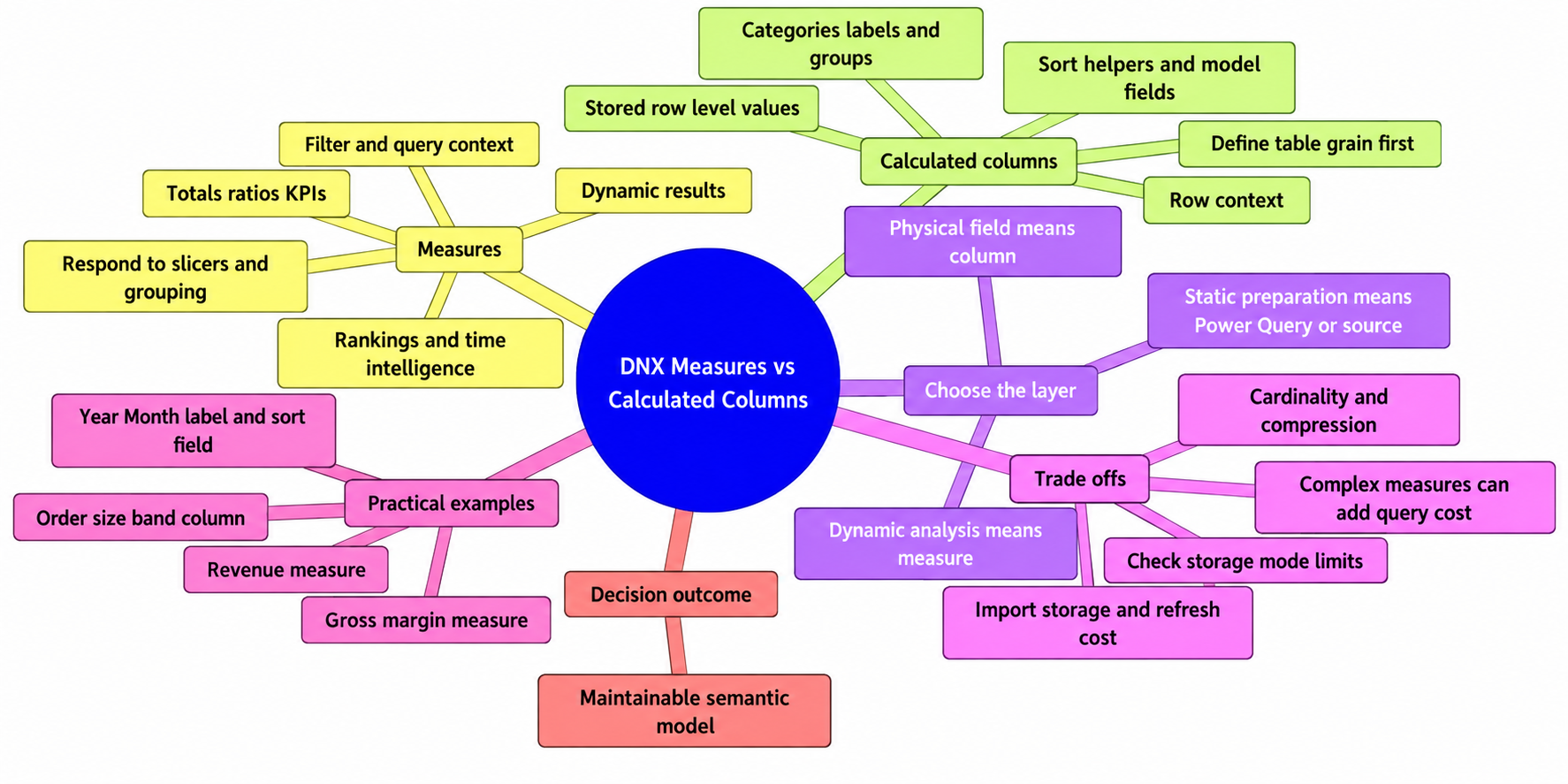
The practical rule for DAX measures vs calculated columns is straightforward: use a measure for an answer that should change with filters, slicers, and visual groupings. Use a calculated column when the semantic model needs a value stored for every row, such as a category, label, sort key, or supporting field.
Total sales belongs in a measure because it should change by month, product, region, or customer selection. A stable label such as Small, Medium, or Large belongs in a column when report authors need to use it in a slicer, axis, legend, or grouping.
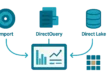
This article uses an Import-mode Power BI semantic model as its baseline. In that setting, calculated columns are processed and stored in the model, while measures are evaluated when a query needs a result. Details differ in DirectQuery, Direct Lake, and composite models, so confirm the current behavior and limitations for the storage mode you deploy.
DAX Measures vs Calculated Columns: The Short Answer
| If you need to… | Usually choose… | Why |
|---|---|---|
| Calculate revenue, margin, variance, ranking, or a rolling total | Measure | The answer should respond to the current filter context. |
| Create a category for a slicer, axis, legend, or grouping | Calculated column | The model needs a physical field with a value at row grain. |
| Create a sort order for a display label | Calculated column | Sort by column works with model columns, not measures. |
| Clean text, change data types, merge data, or create reusable keys | Power Query or the source system | This is usually data preparation rather than report-time analysis. |
Before writing DAX, ask: Am I answering a question about the rows currently in scope, or adding an attribute that the model must retain for every row? The first need usually points to a measure; the second points to a column.
What Is a DAX Measure?
A measure is a named DAX expression that returns one result for the query context requesting it. That context is shaped by a visual, slicers, page and report filters, relationships, and matrix row or column headers.
In a sales model, a basic explicit measure is:
Revenue = SUM ( Sales[Sales Amount] )On a card, Revenue returns sales for the current selection. Put Region on matrix rows and Year on columns, and Power BI evaluates the same measure separately for each intersection. The formula does not change; the filters affecting it do.
An implicit measure is an automatic aggregation, such as Sum or Average, created when a numeric column is added to a visual. An explicit measure is one you define and name, such as Revenue. Explicit measures make business logic, formatting, and reuse visible. They are also required for calculation groups because calculation items apply only to explicit measures.
How Measures Respond to Report Context
Measures fit analytical questions: sales for selected dates, budget variance for the current product category, or each channel’s share of the selected total. They are not stored as a precomputed answer for every fact-table row. That does not make them cost-free: complex filters, iterators, and dependencies can add report-query work.
Why Measures Are Usually Best for Aggregations and KPIs
Totals, counts, ratios, variances, and comparisons are normally measures because their meaning depends on the rows included in the current context. A common gross-margin pattern is:
Gross Profit =
SUMX (
    Sales,
    Sales[Sales Amount] - Sales[Cost Amount]
)
Gross Margin % = DIVIDE ( [Gross Profit], [Revenue] )When the numerator and denominator use matching filter context and compatible grain, this calculates the percentage from current aggregated values. It avoids the common mistake of averaging transaction-level percentages, which can give a small transaction the same weight as a large one.
SUMX evaluates an expression row by row, but the measure still returns one scalar result for the current query context. Iteration inside a measure is not the same as creating a persistent row-level field.
What Is a Calculated Column?
A calculated column is a DAX expression evaluated for each row of a table. In a standard Import table, its resulting values are processed during refresh and stored in the semantic model. The result can then be used like another model field in slicers, filters, axes, legends, rows, columns, and groupings.
For a clear grain example, assume an Orders table contains one row per order and an Order Amount column. A stable classification can be written as:
Order Size Band =
SWITCH (
    TRUE (),
    Orders[Order Amount] < 100, "Small",
    Orders[Order Amount] < 500, "Medium",
    "Large"
)
Each order receives one band when the model is processed. Filtering a report to West changes which orders appear, but does not recalculate an existing order from Medium to Large. If the table were at order-line grain, the same expression would classify lines rather than orders; define table grain before creating a column.
Where Calculated Columns Fit in a Data Model
Calculated columns are appropriate when a report or model needs a field rather than a changing result. Typical uses include stable customer segments, fiscal labels, status categories, business groupings, and numeric sort helpers.
A measure itself cannot serve as a normal categorical axis, slicer field, relationship key, or Sort by column field. Measures are ordinarily visual values or visual-level filters. A selection-dependent status can be displayed by a measure or used for conditional formatting, but it cannot become a conventional reusable slicer category without a physical field or a different model design.
For a Year-Month label, the label and sort field must be at the same granularity, and each distinct label must map to exactly one sort value.
The Model-Size and Refresh Trade-Off
A calculated column is not free because the formula is short. In an Import model, it adds stored data and processing work. Its impact depends on row count, data type, cardinality—the number of distinct values—compression, and whether it is added to a large fact table or smaller dimension table.
A three-band category can be a sensible addition. A nearly unique text expression in a very large fact table can add substantial model cost. Static transformations are often more efficient and maintainable in Power Query or upstream. For related design guidance, see How to Optimize a Slow Power BI Report.
Key Differences Between Measures and Calculated Columns
| Characteristic | Measure | Calculated column |
|---|---|---|
| Typical evaluation timing | When a query needs a result | During model processing in standard Import models |
| What is stored | The definition, not a result per row | A value for each row in the table |
| Primary context | Filter or query context | Row context |
| Response to slicers | Usually changes with the current context | The stored value does not recalculate for each selection |
| Typical output | A scalar result, KPI, or aggregation | A row-level attribute |
| Categorical model role | Not a normal slicer, axis, or grouping field | Can be used as a model field where supported |
| Relationships and sorting | Cannot be a relationship key or Sort by column field | Can participate where model and storage-mode rules allow |
| Refresh processing | No per-row result is materialized in Import storage | Materialized Import columns add processing work |
| Query-time effect | Complex logic can add query cost | Stored fields can affect model efficiency and query shape |
These are default roles, not every possible DAX behavior. Iterators can establish row context in a measure, and CALCULATE can introduce filter behavior in a calculated column. Storage-mode behavior also varies: DirectQuery calculated columns are not materialized in the same way as Import columns.
Row Context vs Filter Context: The Difference That Drives the Choice
Row context means “the current row.” A calculated column receives it automatically, which is why Order Size Band can read the Order Amount for its current order.
Filter context is the set of filters affecting a calculation. It can come from a slicer, visual header, filter pane, relationship, or DAX expression. Measures are evaluated in that context, which is why Revenue changes across a month-by-region matrix.
How Context Transition Can Blur the Line
SUMX creates row context while it iterates a table. CALCULATE modifies filter context and can convert an existing row context into filter context, a behavior called context transition. These mechanics enable advanced calculations, but they do not turn a measure into a physical category field.
When to Use a Measure
Choose a measure when users should get a different answer as they change dates, products, customers, regions, scenarios, or the grouping in a visual.
Use Measures for Totals, Ratios, and KPIs
- Total revenue, total cost, units sold, and distinct customer count.
- Gross margin percentage, conversion rate, average order value, and utilization.
- Actual-versus-budget variance, share of total, dynamic ranking, and conditional KPI status.
Dynamic Top N is a useful example. It is commonly implemented with a visual Top N filter, a rank measure, or both. The top products can change when selected dates, regions, or metrics change.
Use Measures for Time Intelligence and Comparison Logic
Year-to-date, prior-period, year-over-year, rolling-period, and target-comparison calculations are normally measures because the relevant period comes from current date context. Use a compliant date table. DAX time-intelligence functions require one; marking is required for Classic time intelligence, while Microsoft’s calendar-based approach does not generally require marking except in specified circumstances.
When to Use a Calculated Column
Use Calculated Columns for Stable Classifications and Labels
Use a calculated column when a stable row-level category must be available to report authors. Examples include an order-size band, customer tier, product lifecycle label, fiscal-period display label, or status category. The rule should be stable at processing time, not dependent on a report user’s later selection.
Use Calculated Columns When the Model Needs a Field
Create a column for a categorical axis, slicer option, group, sort helper, or other field-based role. A calculated column can support a relationship where allowed, but DAX should not be the default place to manufacture durable business keys. Source systems, warehouses, and Power Query are usually better for governed keys and reusable joins.
For a conventional one-to-many relationship, the column on the one side must contain unique values. Many-to-many relationships are supported, but require deliberate modeling. See Power BI Semantic Model Best Practices: Star Schema, DAX, and Performance and Star Schema vs Snowflake Schema in Power BI for broader design context.
Measure or Calculated Column? Practical Scenarios
| Requirement | Preferred option | Why |
|---|---|---|
| Total sales | Measure | It must change by date, product, region, and other filters. |
| Gross margin percentage | Measure | Calculate from current aggregated profit and revenue. |
| Customer age band at a defined snapshot date | Column or upstream field | A stable category can be used in a slicer; define when the snapshot updates. |
| Dynamic Top 10 products | Measure plus visual filtering | Ranking changes with the current metric and filter context. |
| Year-Month label and chronological order | Columns or Power Query fields | The visual needs physical display and sort fields. |
| Days since order date | Depends on required behavior | Use a measure for a query-time displayed value; use a calculated column, Power Query, or source field for a refresh-time category; use governed source or scheduled-refresh logic when a persisted daily snapshot is required. |
| Sales territory assigned to each customer | Source or Power Query first | It is a stable attribute, and governed mapping is usually easier to maintain upstream. |
| Category based on selected budget scenario | Measure for dynamic presentation | It changes with selection and cannot become a normal reusable slicer category without a physical modeling solution. |
When Neither Is the Best Choice
Do not use DAX by reflex. Source SQL, a warehouse transformation, or Power Query is usually a better home for type conversion, text cleanup, identifier parsing, joins, deduplication, reusable keys, and business logic shared across reports.
Power Query custom columns are also stored at refresh, but they are created before data enters the model. That makes them a strong fit for static shaping. DAX calculated columns remain useful when logic genuinely depends on the semantic model and its relationships.
A Decision Checklist for Your Next Calculation
- Must the result respond to slicers or visual grouping? Start with a measure.
- Does the model need a physical field for a slicer, axis, grouping, sort order, or relationship? Consider a column.
- Is the result a total, ratio, percentage, ranking, comparison, or time calculation? It is probably a measure.
- Is it a stable classification at a clearly defined table grain? It may be a calculated column.
- Is the work static cleansing, joining, key creation, or transformation? Prefer Power Query or the source system where practical.
- Will the column be high-cardinality or added to a large fact table? Assess model size, compression, and refresh cost first.
- Are you using DirectQuery, Direct Lake, or a composite model? Verify the applicable feature and storage-mode limitations.
The durable rule is simple: measures answer dynamic analytical questions; calculated columns provide stored model fields. Choose based on the role the result must play, then place the logic in the most maintainable layer.
DAX Measures vs Calculated Columns
Frequently Asked Questions
What is the main difference between a DAX measure and a calculated column?
A measure returns a result for the current filter and query context, while a calculated column creates a value for every row and stores it in the model in a standard Import model.
When should I use a DAX measure in Power BI?
Use a measure for dynamic calculations such as totals, ratios, variances, rankings, rolling totals, time-intelligence calculations, and KPIs that should respond to slicers and visual groupings.
When should I use a calculated column in Power BI?
Use a calculated column when the model needs a stable row-level field, such as a category, label, sort helper, grouping field, or other attribute that can be used in a slicer, axis, legend, or relationship where allowed.
Can a measure be used as a slicer, axis, or Sort by column field?
A measure itself cannot be used as a normal categorical slicer field, axis, relationship key, or Sort by column field. Measures are ordinarily used as visual values or visual-level filters.
How do calculated columns affect Power BI model size and refresh?
In an Import model, calculated-column values are stored during model processing, adding data and refresh work. The impact depends on factors such as row count, data type, cardinality, compression, and table size.
Should I use Power Query or the source system instead of DAX?
Prefer Power Query or the source system for static cleansing, type changes, text preparation, joins, deduplication, reusable keys, and logic shared across reports. Use DAX when the logic genuinely belongs in the semantic model.
How do row context and filter context guide the choice?
Calculated columns receive row context automatically and evaluate each row. Measures are evaluated in filter or query context, which is shaped by slicers, visual groupings, filters, relationships, and DAX expressions.
What should I consider before creating a calculated column?
Define the table grain first, confirm that the field is stable at refresh time, and assess model-size, compression, and refresh implications. Also verify the limitations of the storage mode you deploy.
Sources
- Microsoft Learn: Use Calculation Options in Power BI Desktop
- Microsoft Learn: Create Calculated Columns in Power BI Desktop
- Microsoft Learn: Use Calculation Groups in Power BI Desktop
- Microsoft Learn: DAX Overview
- Microsoft Learn: CALCULATE Function (DAX)
- Microsoft Learn: Data Reduction Techniques for Import Modeling
- Microsoft Learn: Design Guidance for Date Tables in Power BI Desktop
- Microsoft Learn: Sort One Column by Another Column in Power BI
- Microsoft Learn: Understand Relationships in Power BI